
You post something you are proud of. Within the hour, the comments start to arrive. A few are real questions from people ready to buy. A few are kind. And a few are a fake giveaway link, a scam pretending to be your support team, or a stranger being cruel.
Now you are the moderator, the customer support team and the community manager, usually on your phone and usually late at night. Whether you run a brand or a channel, that is the daily reality of an active comment section. Here are the problems, and then the fix.
The problems with an unmoderated comment section
1. Spam and scam comments
Spam is annoying. Scams are dangerous, because they sit right under your post, where your customers and followers are looking. The U.S. Federal Trade Commission reported in April 2026 that reported losses to scams on social media were eight times higher than in 2020. Security firm Check Point described scammers who watch airline complaints on social media and pose as customer support, so a frustrated customer may reach the wrong people first.
If a fake link stays under your post, it is your page it appears on. Customers do not always notice the difference between your account and an impersonator.
2. Abusive and hateful comments
Abuse hurts the people who read it, and it hurts the people who run the page. In 2017, WBTV reported that the owner of a local restaurant received death threats after the restaurant's Facebook post went viral. That is an extreme case, but smaller versions happen to creators and small brands every day: insults, harassment and pile-ons that drive away the very people you want to reach.
3. Questions that nobody answers
Many comments are buying signals: "How much?", "Do you ship to Canada?", "Is this available in the UK?" Sprout Social's 2025 Index (a vendor survey) reports that 73% of social users say they would buy from a competitor if a brand does not respond. Every unanswered question is a customer who may go somewhere else.
4. The hours it takes
Reading, replying to and cleaning up comments is scattered work: five minutes here, ten minutes there. The maths is simple. Comments per day x seconds per reply x 7 days, divided by 3,600, gives hours per week. For 150 comments a day at 30 seconds each, that is 8.75 hours a week. (That is an illustration based on our own arithmetic, not a measured figure.) Time like that could go into filming, writing, or serving customers.
5. Built-in filters only go so far
YouTube, Instagram and Facebook all give you moderation tools. YouTube lets you hold comments for review, and Facebook added keyword moderation and profanity blocklists to Pages. They help. But they work from lists and settings that you create and keep up to date, and in our view a scam written with new wording, or a polite-looking fake support message, can slip past a word list. They also do not answer your customers for you. We cover this in more detail in our post on what built-in comment filters miss.
Brands and creators: same problem, different pressure
Brands and businesses
Creators
Biggest worry
Scams and fake support accounts under posts and ads, and leads lost to slow replies
Spam giveaways, impersonators, hate comments, and burnout from reading everything
What silence costs
Sales and customer trust
Community and engagement
What helps most
Fast, on-brand replies and a clean comment section
A safe, welcoming space without doing it all by hand
The solution: AI comment moderation
AI comment moderation takes over the sorting. It reads each new comment, works out what the person wants, and acts on your rules:
· Normal comments and questions get a reply in your tone, based on answers you have approved.
· Spam, scams, and abusive comments are hidden or removed.
· Sensitive comments, such as refund requests or serious complaints, are flagged so a person can handle them.
· Buying signals do not get lost in the noise.
How each type of comment is handled.
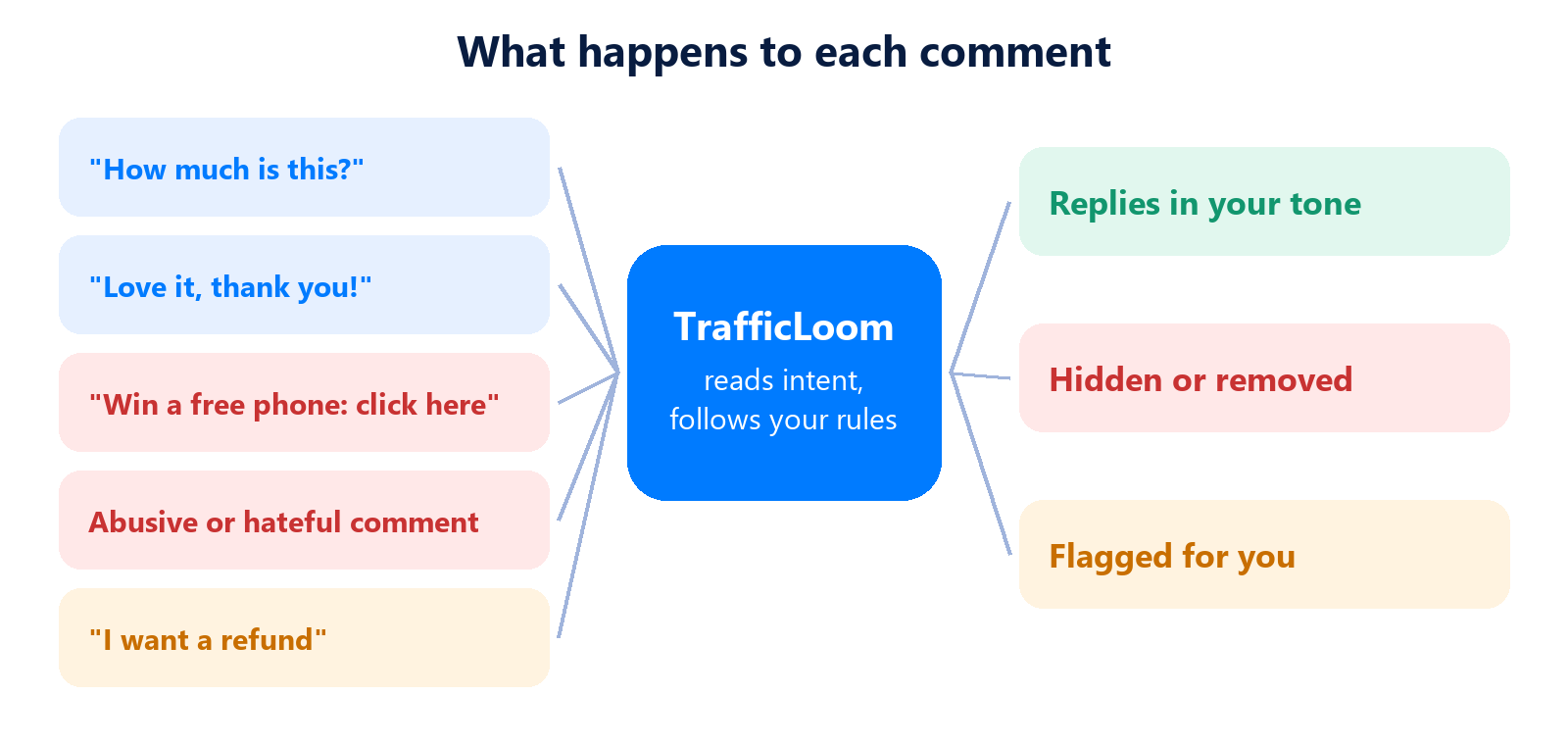
You stay in charge. You decide what gets removed, what gets a reply, and what comes to you. A harsh but honest complaint, for example, is not always something to delete, and hiding real feedback can look worse than answering it. In a real setup, those rules are yours.
What you gain
For brands
· Scams and spam do not sit under your posts and ads.
· Questions get answered quickly, so interested customers do not drift away.
· Your team stops spending hours a week on sorting.
For creators
· A safer, friendlier comment section for your community.
· Fewer hateful and spam comments reaching you.
· More time and energy for the content only you can make.
What TrafficLoom provides
TrafficLoom's Social Media Comments Moderation & Reply service monitors, replies to and moderates the comments on your Facebook, Instagram and YouTube pages for you. Replies follow your tone and your approved answers, spam, scams and abuse are handled by your rules, and anything sensitive comes to a person.
We offer a free demo so you can see exactly how it works before you decide. The one in our demo video used three test comments on a real Facebook page: a friendly comment got a reply, a request to talk to a salesperson about a refund was flagged for a human, and a harsh comment was removed. In that video we said setup usually takes a few days. The timing depends on your pages and your rules, so ask us when you message.
Two illustrations (not real clients)
· Illustration (not a real client): a coffee shop in Toronto posts a weekend offer. Dozens of comments ask about opening hours and prices, and one claims to be "official support" with a link. With moderation, the questions get friendly answers, and the fake support comment is removed.
· Illustration (not a real client): a fitness creator in Manchester posts a new video. A few hateful comments and a giveaway scam appear in the first hour. They are hidden before most viewers see them, and genuine questions are answered.
Use local spelling and tone for each market, such as colour and favourite in the UK and Canada, and color and favorite in the USA.
How to get started
· List the platforms you use: Facebook, Instagram, YouTube.
· Write down your approved answers to common questions: price, delivery, opening hours, booking.
· Decide what should be removed, what should get a reply, and what should come to you.
· Ask for the free demo and watch it work on test comments.
· Review the replies in the first few weeks, and adjust the rules.
Questions we hear a lot
Will the replies sound like a robot?
Replies are written in your tone from answers you approve, and you can review them in the first weeks. See our post on AI replies that sound like you.
Will it delete honest criticism?
Not unless you want it to. You decide with us whether a comment like that is removed or sent to a person.
Does this replace me?
No. It removes the sorting. You stay in charge of anything sensitive and of the relationships that matter.
Which platforms does it cover?
Our comment moderation service is aimed at Facebook, Instagram, and YouTube pages.
Key takeaways
· Unmoderated comments bring spam, scams, abuse, unanswered questions and lost hours.
· Built-in filters help, but they do not reply to customers and they depend on word lists you maintain.
· AI comment moderation reads each comment, replies, removes, or flags it, based on your rules.
· Brands protect sales and trust. Creators protect their community and their energy.
· TrafficLoom offers a free demo so you can see it work first.
Sources
· U.S. FTC Data Spotlight, April 27, 2026, reported losses to scams on social media eight times higher than in 2020: https://www.ftc.gov/news-events/data-visualizations/data-spotlight/2026/04/reported-losses-scams-social-media-eight-times-higher-2020
· Check Point, Scammers are watching airline complaints and posing as customer support (September 16, 2026): https://blog.checkpoint.com/exposure-management/scammers-are-watching-airline-complaints-and-posing-as-customer-support/
· WBTV, Owner received death threats after local restaurant's Facebook post went viral (March 8, 2017): https://www.wbtv.com/story/34690803/owner-received-death-threats-after-local-restaurants-facebook-
· Sprout Social Index 2025, customer service statistics: https://sproutsocial.com/insights/social-media-customer-service-statistics/
· YouTube Help, Moderate comments: https://support.google.com/youtube/answer/15535966
· Adweek, Facebook Adds Keyword Moderation and Profanity Blocklists to Pages: https://www.adweek.com/performance-marketing/keyword-moderation-profanity-blocklist/
· The hours-per-week figure is our own arithmetic. The Toronto and Manchester examples are hypothetical illustrations.
Ready to get started?
Contact us today. TrafficLoom monitors, replies to, and moderates your social media comments for you, so spam, scams and abuse never reach your customers. Tell us which pages you want protected and ask for your free demo.